Guide · Your car
Bring your Fuelio history into Kavouki
At the end the fill-ups you logged in Fuelio are in your vehicle in Kavouki, with their km and costs, so consumption, cost per km and km-based reminders work from the first day.
Before you start
- The vehicle in Kavouki (see Add your car).
- Fuelio with that vehicle's log. One CSV file holds one vehicle.
Kavouki is not affiliated with or endorsed by Fuelio. It reads the CSV file that Fuelio exports.
1. Export the CSV in Fuelio
In Fuelio, export the vehicle to CSV
Fuelio's own help names the path Settings › Backup › Export CSV; the labels may differ in your version of Fuelio.
Find the file
Fuelio saves it in its own folder on the phone, and in your Google Drive or Dropbox if you use Fuelio's cloud backup. Its name looks like
vehicle-1-sync.csv.Fuelio on another phone? Move the file
Copy it to the phone with Kavouki, or download it there from your cloud drive.
Result: a .csv file of the vehicle's Fuelio log that this phone can open.
2. Import it into Kavouki
Open the vehicle and scroll to Fuel
Tap the vehicle's card under Your vehicles on its dashboard.
Tap Import from Fuelio
The screen explains what happens: "Kavouki reads the fill-ups and adds them to" your vehicle; "nothing leaves your phone".
Tap Choose the CSV file and pick it
Kavouki reads it without changing anything ("Reading the file…").
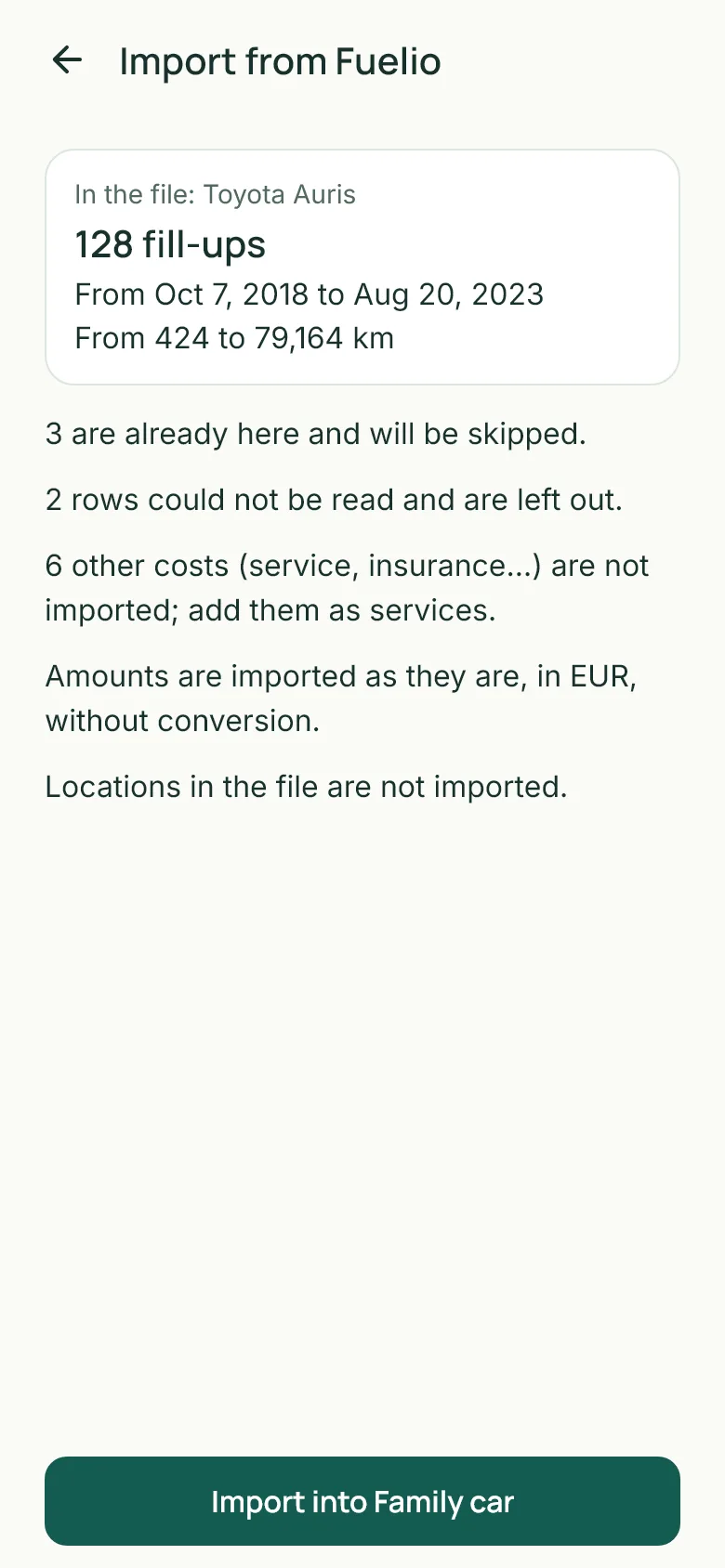
Check the preview
The vehicle's name in the file, the number of fill-ups, from which date to which and from which km to which, then notes on what will be skipped or converted (part 3).
Tap Import into Family car
The button carries your vehicle's name. Then you see "Imported" and how many fill-ups were added; tap Done.
Result: the fill-ups are in the vehicle's Fuel section, with consumption and cost per km worked out. Their km count as readings, so km-based service reminders move with them.
3. What comes in, and what does not
- Imported: the date, the km, the litres (or kWh), the total paid (or price per litre × litres when the total is missing), full or partial tank, a missed fill-up, the station (from Fuelio's city) and the notes.
- Converted: miles to km, and US or imperial gallons to litres. The preview says so.
- A second tank, such as an LPG car's petrol: added as partial fills, so it never cuts a measured stretch short.
- Skipped: fill-ups already in Kavouki from an earlier import, and rows that cannot be read: a missing or impossible date, km or quantity, or a day still to come. A date like 03/04 that reads both ways is left out too.
- Not imported: Fuelio's other costs (service, insurance…), which are counted so you can add them as services; and locations: latitude and longitude are never read.
- Amounts come in as they are, in the home's currency, without conversion.
Tip: still using Fuelio for a while? Import a fresh export later: what is already here is skipped, so only the new fill-ups come in.
Where your data goes
Kavouki reads the file on your phone and deletes its own working copy afterwards; nothing is sent anywhere. Fuelio's file stays where it was.
If something goes wrong
A refused file shows "This file cannot be imported", the reason and Choose another file. Nothing was added.
- "This does not look like a Fuelio export." Choose the CSV file Fuelio saved, not a spreadsheet you edited or another app's export.
- "The file is too big: up to 20,000 fill-ups and 5 MB." Export a shorter period from Fuelio.
- "There are no fill-ups in this file." Check that you exported the right vehicle, then export it again.
- "Everything in this file is already here." You imported it before; nothing new to add.
- Some dates were left out ("a date that reads both ways, like 03/04"): add those fill-ups by hand with Add fill-up.
Questions
Is Kavouki connected to Fuelio?
No. Kavouki is not affiliated with or endorsed by Fuelio, and connects to nothing: it reads the file you export.
Can I import from other fuel apps?
Not yet: only Fuelio's CSV. You can type older fill-ups by hand with Add fill-up.
Can I import into an electric car or a motorbike?
Yes, into any vehicle. For an electric car the amounts are kWh, as the vehicle's fuel says.
Still stuck? Write to support@kavouki.com with the message you see, your phone model and the Kavouki version (Settings › About). Please do not send the file itself unless we ask and you agree.