Free template · CSV
Home inventory spreadsheet template
A list of everything you own, in the spreadsheet app you already use: name, room, brand, serial number, price, warranty. Fill it in on your computer, and when you want photos and reminders, Kavouki imports it as it is.
Free. No email, no sign-up, no macros. Opens in Excel, Numbers, Google Sheets and LibreOffice.
What you get
- One header row with the 13 columns Kavouki reads
- Two example rows to copy and overwrite
- English headers, or Greek headers with Greek-Excel separators
- UTF-8, so Greek names and the € stay readable
- The same columns as Kavouki's own export, so a list can go back and forth
The columns
What to write in each column
Only Name is required. Leave anything you don't know empty; you can fill it in later.
| Column | What to write |
|---|---|
| Name Όνομα | What the thing is. Up to 120 characters. A row without a name is left out. Example: Cordless drill |
| Location Θέση | Where it is, from the room inwards, separated by /. Missing spaces are created: the first level as a room, deeper levels as storage. Existing ones are matched, ignoring capitals. Example: Garage / Shelf A |
| Category Κατηγορία | One word from the list below, in English or Greek. Example: Tools |
| Quantity Ποσότητα | A whole number. Empty means 1. Example: 1 |
| Brand Μάρκα | The maker. Example: Bosch |
| Model Μοντέλο | The model name or number from the label. Example: GSR 18V-55 |
| Serial number Σειριακός αριθμός | From the label or the box. Useful for a claim or a theft report. Example: SN-48213 |
| Purchase date Ημερομηνία αγοράς | 2025-03-14, 14/3/2025 or 14.3.2025 (day first). Example: 2025-03-14 |
| Price Τιμή | What you paid, with a point or a comma for the cents. No currency sign. Example: 129.99 |
| Currency Νόμισμα | Three letters. Empty means your home's currency. Example: EUR |
| Warranty expires Λήξη εγγύησης | The day the shop or maker warranty ends. Kavouki adds a warranty with this date. Example: 2027-03-14 |
| Notes Σημειώσεις | Anything else: where the charger is, who lent it to you. Example: Charger is in the blue case |
| Barcode Γραμμωτός κώδικας | The digits under the barcode (EAN or UPC). The headers EAN and UPC work too. Example: 4059952526683 |
Category words Kavouki understands
Write the category as one of these words (English or Greek, with the Greek accents), or as the full name the app shows in its current language, for example "Tools & DIY". A word it doesn't know leaves the category empty, and the preview tells you how many cells that happened to.
| Category in the app | English words | Greek words |
|---|---|---|
| Appliances | appliances | συσκευές |
| Electronics | electronics | ηλεκτρονικά |
| Furniture | furniture | έπιπλα |
| Kitchen & dining | kitchen, kitchenware, dining | κουζίνα, σκεύη |
| Tools & DIY | tools, diy | εργαλεία |
| Garden & outdoor | garden, outdoor | κήπος |
| Clothing & accessories | clothing, clothes, accessories | ρούχα, αξεσουάρ |
| Jewellery & watches | jewellery, jewelry, watches | κοσμήματα, ρολόγια |
| Art & décor | art, decor | τέχνη, διακόσμηση |
| Sports, toys & hobbies | sports, toys, hobbies | αθλητικά, παιχνίδια, χόμπι |
| Books & media | books, media | βιβλία |
| Vehicles | vehicles, car, motorbike, boat | οχήματα, αυτοκίνητο |
| Other | other | άλλο |
Fill it in
Open it in Excel, Numbers or Google Sheets
One row per thing. Start with one room: the valuable, the hard to replace, the things with a warranty.
Excel
Double-click the file. If everything lands in column A (Windows set to Greek or another comma-decimal language does this), open a blank workbook and use Data › From Text/CSV instead. To save, choose CSV UTF-8 (Comma delimited); plain "CSV" can garble Greek letters and the € sign.
Numbers
Open the file on a Mac, iPhone or iPad. To save it back, use File › Export To › CSV and keep the text encoding at Unicode (UTF-8).
Google Sheets
Use File › Import › Upload and leave the separator on "Detect automatically". To save, use File › Download and Comma-separated values (.csv).
Long numbers in Excel. Excel shows a 13-digit barcode as 4.06E+12 and saves it that way, which loses the code. Select the Barcode column and set it to Number with 0 decimals before you save, or to Text before you type. Do the same for serial numbers that start with 0.
The Greek file uses a semicolon between columns, a comma for cents and day-first dates, which is how Excel writes CSV files on a computer set to Greek. Kavouki reads both kinds, so use whichever opens neatly on your computer.
Bring it into Kavouki
Import from spreadsheet (CSV)
Put the file on your phone
Email it to yourself, save it from your cloud drive, or copy it with a cable.
Open the import
In Kavouki, go to Settings › Data & backup and tap Import from spreadsheet (CSV). Choose the file.
Check the preview
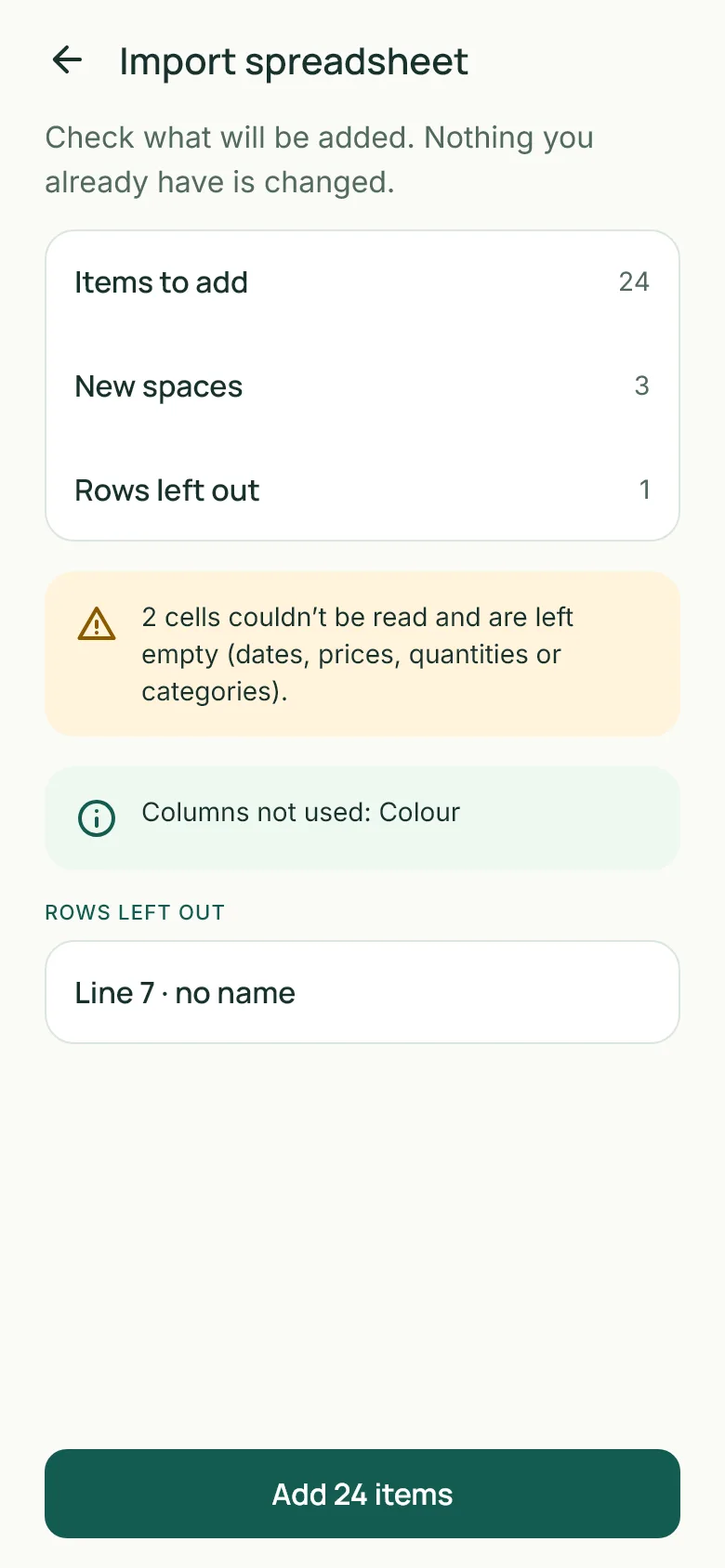
You see the items to add, the new spaces it will create, rows left out (with their line numbers), cells it couldn't read and columns it doesn't use. Nothing is added yet.
Add the items
Tap Add 24 items (the number is yours). Then Go to My Home: your rooms and things are there, ready for photos and receipts.
The import only adds: nothing you already have in Kavouki changes. Step by step, with what to do if a file is refused: import a spreadsheet.
What the import accepts
- Files up to 5 MB and 5,000 rows, with up to 4,000 characters in a cell. Bigger lists: split them and import the parts.
- Commas or semicolons between columns; UTF-8 text, with or without the byte-order mark.
- Headers in English or Greek, in any order and in capitals or not. Columns it doesn't know are listed and ignored.
- A cell it can't read (a date like 30 February, a price like "about 50") is left empty and counted; the row is still added.
- Your own spreadsheet works too, as long as the first row has a "Name" column.
The template is also in the app: Settings › Data & backup › Get the spreadsheet template. And it works the other way: Export as spreadsheet (CSV) writes your whole home to the same columns, free, whenever you like (export to CSV).
Questions
Do I need Kavouki to use the template?
No. It is an ordinary spreadsheet and works on its own as a home inventory. Kavouki adds photos, receipts, warranty reminders and search, and it can import the file whenever you are ready.
Is there an Excel (.xlsx) version?
The template is a CSV file because every spreadsheet app opens it, including Excel. You can keep working in .xlsx if you prefer; save a CSV UTF-8 copy when you want to import it.
What happens if I import the same file twice?
The import only adds, so the items are added a second time. It never changes or deletes what you already have. Check the count in the preview before you tap Add.
Where does my list go?
Nowhere we can see. This website doesn't know what you download or type, and Kavouki keeps the imported items on your phone. A full inventory is a map of your valuables: keep the file somewhere private.
Related
Bring your spreadsheet into Kavouki
Kavouki is free to download for Android, and soon for iPhone. No account, no ads: open it and add your first room.
Checked with Kavouki 1.0 on 2 Nov 2026.