Guide · Insurance
Set your sum insured and compare it with what you own
Type the sum insured from your home insurance policy once. Kavouki shows it next to the estimated value of your things, and says so, calmly, when your things add up to more.
Before you start
- Your home insurance policy. If it lists the building and the contents separately, you need the amount for the contents: the things inside.
- Some items with a price. The estimate only counts items that have one.
This is not insurance advice. Kavouki compares two numbers you typed. It does not know your policy's terms, limits or excess, or how your insurer values things. Ask your insurer or broker about your cover.
In this guide
1. Enter the sum insured
Open Settings › Home & preferences
Under Home you see the home's name, Currency and Sum insured.
Type the amount
Tap Sum insured and type the amount from your policy, in the home's currency. Under the field: “From your home insurance policy. Kavouki compares it with what your things are worth.”
Tap Save
You are back in Settings.
Result: the sum insured is saved with this home. If you have more than one home, each keeps its own.
2. Read the Home tab
Tap Home
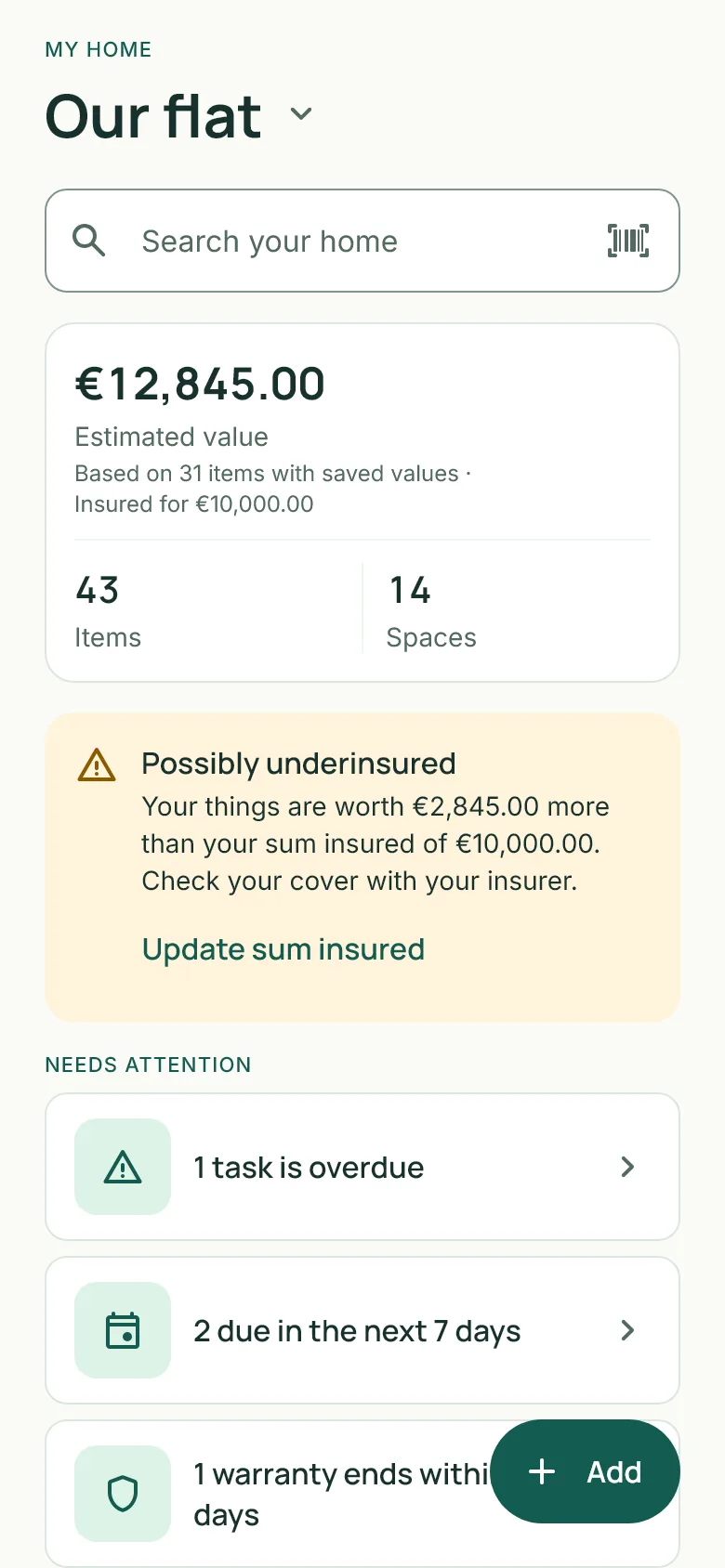
The top card shows the Estimated value, how many items it is based on, and now Insured for with your amount.
Know what the estimate counts
Each item's price times its quantity, for every item with a price in the home's currency. Items without a price, or priced in another currency, are left out.
Result: two numbers side by side: what your listed things cost, and what your policy says it covers.
3. If it says “Possibly underinsured”
Read the notice
When the estimate is higher, a notice appears under the value card: “Your things are worth €2,845.00 more than your sum insured of €10,000.00. Check your cover with your insurer.”
Check the numbers first
Are the prices right, and the quantities? An old price, or a box counted as ten, changes the total. Fix the item, and the notice follows.
Talk to your insurer
If the gap is real, ask your insurer or broker what it means for you. When your policy changes, tap Update sum insured on the notice and type the new amount.
Result: you know where you stand before you ever need to claim. The notice goes away by itself once the sum insured covers the estimate.
“Possibly”, because the prices are what you paid, not what it would cost to replace your things today. Our article on recording your home contents for insurance explains the difference.
If something goes wrong
- No “Insured for” line. No sum insured is saved yet, or it is in another currency than the value. Changing the home's currency does not convert the amount: type it again in the new currency.
- “Enter a valid amount.” Type only the amount, without the currency sign or other text.
- The estimate looks too low. Items without a price are not counted. Add prices, and check the quantity of things you own several of.
Questions
Does Kavouki send my sum insured to anyone?
No. It stays on your phone with the rest of your inventory. It leaves only inside a file you choose to share, such as a backup.
Are the landlord's things counted?
The Home tab counts every item with a price. The insurance report leaves items marked as the landlord's out by default, because a tenant's contents policy covers only their own things.
Will this make a claim easier?
We cannot promise that. Kavouki gives you a dated record of what you own with photos and prices; what your insurer asks for and accepts is up to them.
Is it free?
Yes. The sum insured and the notice are free. The insurance report PDF is part of Kavouki Plus, which is not on sale yet.
Still stuck? Write to support@kavouki.com with your phone model, the version in Settings › About and what you see. Please do not send your policy. Settings › Help & support › Copy diagnostics gives you a short, anonymous list to paste in.